 按下 CCD
把照片装进复古相机画面A retro camera photo studio
查看项目故事 / Read case study ↗体验工具 / Try it ↗


Hello, I’m ImEcho.
This is where I share my experiences, ideas, and work.
More to come.


Hello, I’m ImEcho.
A little about my background, experiences, and ideas.
More of my story is coming soon.
My experiences and journey
will be shared here.





内容营销 · 用户增长 · AI 工具实践
Content marketing · User growth · AI tools
围绕 StarDesk,参与 Reddit AMA、用户反馈整理及 GEO 观察,关注用户承接和社区沟通。
Worked on StarDesk’s Reddit AMA, user feedback and GEO observations, with a focus on user journeys and community communication.
参与社媒品牌内容、AI 生成内容审核与工作流迭代、SEO 内容及数据分析。
Worked across social and brand content, AI content review and workflow iteration, SEO content and analytics.
内容策划与审核、搜索意图与关键词研究、用户反馈整理、GSC / GA4 数据查看、AI 协作原型与迭代。
Content planning and review, search intent and keyword research, user feedback, GSC / GA4 analysis, and prototyping and iteration with AI.
内容准备度诊断原型,使用示例结果与本地规则。
A content-readiness prototype using sample results and local rules.


Get in touch.
For opportunities or a conversation,
feel free to email me.

 Concat Pro增长营销与 AI 内容Growth Marketing & AI Content
 网易互娱 / NetEase Games海外用户增长与社区运营Global Growth & Community
按下 CCD
 And Kwi
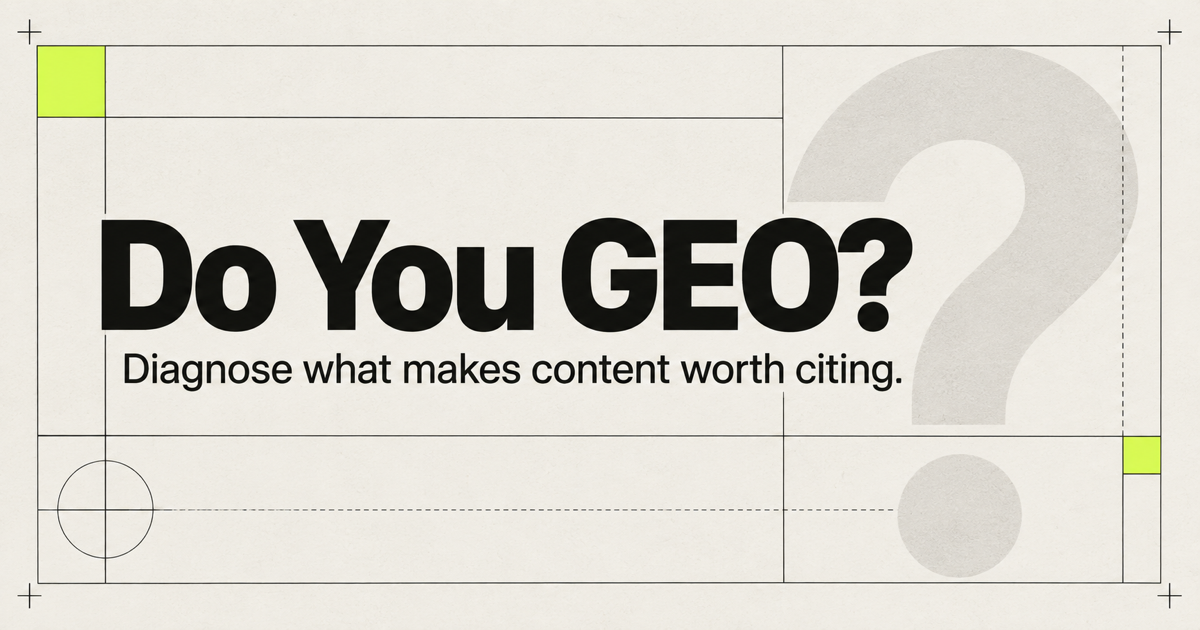 Do You GEO?
Concat Pro 互动卡片的动态展示:卡片倾斜,角色的视线随之移动。
A screen recording of an interactive Concat Pro card, with a tilting card and a gaze that follows the pointer.
More to come.

增长营销与 AI 内容Growth Marketing & AI Content
我在 Concat Pro 的工作涉及搜索内容、社媒叙事、AI 内容质量与增长数据分析。这一页将这些工作线放在一起展示。
My work at Concat Pro spans search content, social storytelling, AI content quality and growth measurement. This page brings those workstreams together.
内容 · 社媒 · AI 工作流 · 数据分析Content · Social · AI Workflows · Analytics
我为围绕品牌小猫形象展开的 Concat’s Days 系列探索短视频选题,关注那些能被讲成清楚、容易引发共鸣的小故事的日常情境。
I explored short-form story ideas for Concat’s Days, a series built around the brand’s cat character. My focus was on everyday situations that could become clear, relatable little stories.
筛选创意时,我同时考虑叙事是否清晰、制作是否可行。一个场景需要有足够的情节支撑短视频,同时也要避免过于复杂的动作和转场,让方案能够实际制作。
I evaluated ideas for both narrative clarity and production feasibility. A scene needed enough of a story to work as a video, while staying simple enough to make without complicated actions or transitions.
明确的情境、一个小变化,以及观众能看懂的反应。
A clear situation, a small change and a readable reaction.
发现生成文章错误描述 Concat 的产品功能后,我直接修改了内部 Brand Memory 中的产品信息,并观察到后续内容中同类错误出现得更少了。
When generated articles described Concat’s product features incorrectly, I directly updated the product information in the internal Brand Memory. I observed that similar errors became less frequent in later output.
我的内容审核覆盖标题、关键词覆盖、链接、产品介绍、事实准确性和配图。我也探索了可复用的视觉提示词与插画 Skill,以提升内容生产的一致性。
My content checks covered titles, keyword coverage, links, product descriptions, factual accuracy and images. I also explored reusable visual prompts and illustration skills to make content production more consistent.
从源头知识中修正反复出现的问题,再检查后续生成结果。
Correct recurring problems in the source knowledge, then review the next output.
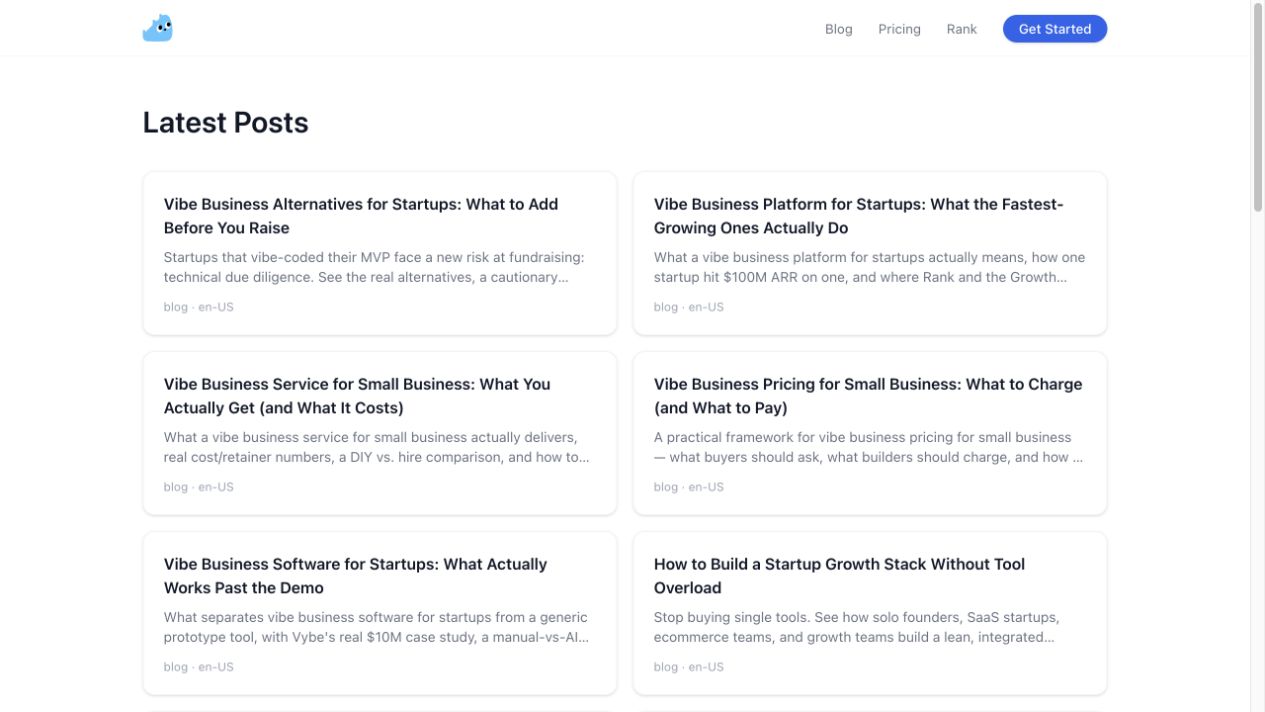
我围绕“小企业增长”拓展内容主题,再逐步细分到“电商业务”和“AI 在电商中的应用”等方向。
I explored content topics around Small Business Growth, then narrowed them into Ecommerce Business and AI for Ecommerce.
我也参与了面向特定行业与平台的排名页面关键词和页面描述整理,例如 Contractor(承包商)相关的 Instagram 排名页面。
My work also included keywords and page descriptions for industry and platform-specific Ranking Pages, such as Contractor-related Instagram pages.
复盘流程时,我探索如何借助 AI 识别重复的标题角度,以及如何依据搜索意图判断:哪些选题应该合并,哪些值得单独展开。
In reviewing the workflow, I explored how AI could help identify overlapping title ideas and how search intent could guide whether topics should be combined or developed separately.
我尝试使用 GSC 和 GA4 查看搜索可见度与站内访问情况。当博客的 /page/ 路径没有出现在 GA4 中时,我围绕页面路径、流量来源及可能的数据采集问题开展排查。
I explored GSC and GA4 to review search visibility and on-site visits. When the Blog’s /page/ URLs did not appear in GA4, I investigated page paths, traffic sources and possible data collection issues.
发布内容、获得关注与理解用户行为,是不同的环节。报表中没有记录时,需要先排查数据采集与统计方式,再对流量情况作出判断。
Publishing content, getting attention and understanding user behaviour are different stages. A missing report is a reason to investigate measurement before drawing conclusions about traffic.
海外用户增长与社区运营Global Growth & Community
在网易互娱实习期间,我参与了面向海外用户的内容与社区增长工作。围绕早期产品 StarDesk,团队尝试用 Reddit 社区对话接触潜在用户、收集反馈,并探索内容在 AI 搜索中的可见度。
At NetEase Games, I contributed to content and community growth for international users. For the early-stage product StarDesk, our team used Reddit conversations to reach prospective users, gather feedback and explore visibility in AI search.
我的经历也涉及用户承接、Discord 大使计划、用户调研、用户教育和需求洞察。下面先以已有复盘材料较完整的 Reddit AMA 与 GEO 为例,展示其中的工作过程。
My experience also includes user onboarding, a Discord ambassador programme, user research, education and needs discovery. The Reddit AMA and GEO work below is the case with the most complete retrospective material available.
Reddit AMA · GEO · 社区运营 · 用户洞察Reddit AMA · GEO · Community · User Insights
StarDesk 处于早期阶段,需要找到愿意体验产品的种子用户。Reddit 上的用户讨论集中而深入,但推广帖能否保留、用户是否愿意交流,以及新增如何归因,都是实际挑战。
As an early-stage product, StarDesk needed to reach people willing to try it. Reddit offered focused, detailed discussions, but post survival, genuine participation and attribution were practical challenges.
团队选择以 AMA(Ask Me Anything)展开对话:既介绍产品,也直接回答问题、邀请体验,并从真实讨论中理解用户关注的功能和顾虑。
The team used AMA (Ask Me Anything) sessions to introduce the product, answer questions, invite people to try it and learn what mattered to them.
以上为团队复盘中记录的累计数据,并非个人独立成果。归因新增不含自然量及贴文发出两周后的长尾新增。
These are cumulative team figures from the retrospective, not individual results. Attributed new users exclude organic volume and the long tail after two weeks.
相关公开帖子
Related public discussions
Reddit AMA:远程游戏与产品体验Reddit AMA: remote gaming and product feedback ↗ Reddit 讨论:产品使用与登录方式反馈Reddit discussion: product use and sign-in feedback ↗以上帖子供查看公开讨论;累计数据来自团队复盘,不能由单篇帖子单独验证。
These posts show public discussions. The cumulative figures come from the team retrospective and cannot be verified from an individual post alone.
我参与的工作包括筛选与产品使用场景相关的活跃 subreddit、梳理社区规则、准备 AMA 内容并跟进评论。团队区分允许自我推广与需要联系管理员的社区,再按不同社区的语境准备内容。
I contributed to finding active subreddits relevant to the product, reviewing community rules, preparing AMA content and following discussions. The team distinguished communities that allowed self-promotion from those requiring moderator contact, then adapted content to each context.
内容需要说清发起者、产品、差异点和体验入口。发帖后,团队持续查看评论,回答产品问题、回应质疑、邀请用户尝试,并记录讨论中反复出现的需求。
Each post needed to explain who was hosting, what the product did, how it differed and where to try it. After publishing, the team monitored comments, answered questions and concerns, invited trials and recorded recurring needs.
筛选社区 → 核对规则与沟通 → 准备 AMA → 回答与邀约 → 整理反馈
Find communities → check rules and coordinate → prepare the AMA → respond and invite → document feedback
复盘中有一个具体例子:部分用户对仅支持 Google 登录提出异议,认为这会阻碍他们尝试产品。团队在回复中继续询问他们能否接受这种方式,以及希望增加什么登录选项;邮箱密码登录在当时被列入需求排期。
One example in the retrospective was sign-in: some users said Google-only login discouraged them from trying the product. The team followed up about their preferences; email-and-password login was on the product roadmap at that time.
另一类高频问题是“为什么不用竞品?”团队最初强调低延迟、高画质等指标,后来尝试改用更具体的操作与使用场景解释差异;复盘记录这一表达也为后续素材提供了方向。
Another recurring question was why someone should choose StarDesk over an alternative. The team moved from abstract claims such as low latency and image quality toward concrete actions and use cases; the retrospective notes that this also informed later creative materials.
除了单次活动带来的访问,团队还围绕与产品使用场景相关的游戏话题,观察社区内容与官网内容在 Google AI Overview 和 Reddit AI 搜索中的呈现。
Beyond visits from individual activities, the team explored game topics relevant to the product and observed how community and website content appeared in Google AI Overview and Reddit AI search.
复盘记录了 StarDesk 曾在相关搜索中被展示,以及一次 Reddit AI 搜索结果中的竞品对比位置。这是当时的观察,搜索呈现会变化,也不能据此保证长期排名或引用。
The retrospective recorded StarDesk appearing in relevant searches and a comparison with competitors in one Reddit AI result. These were observations at the time; search appearances change and do not guarantee lasting rankings or citations.
把照片装进一台旧相机A little retro camera photo studio
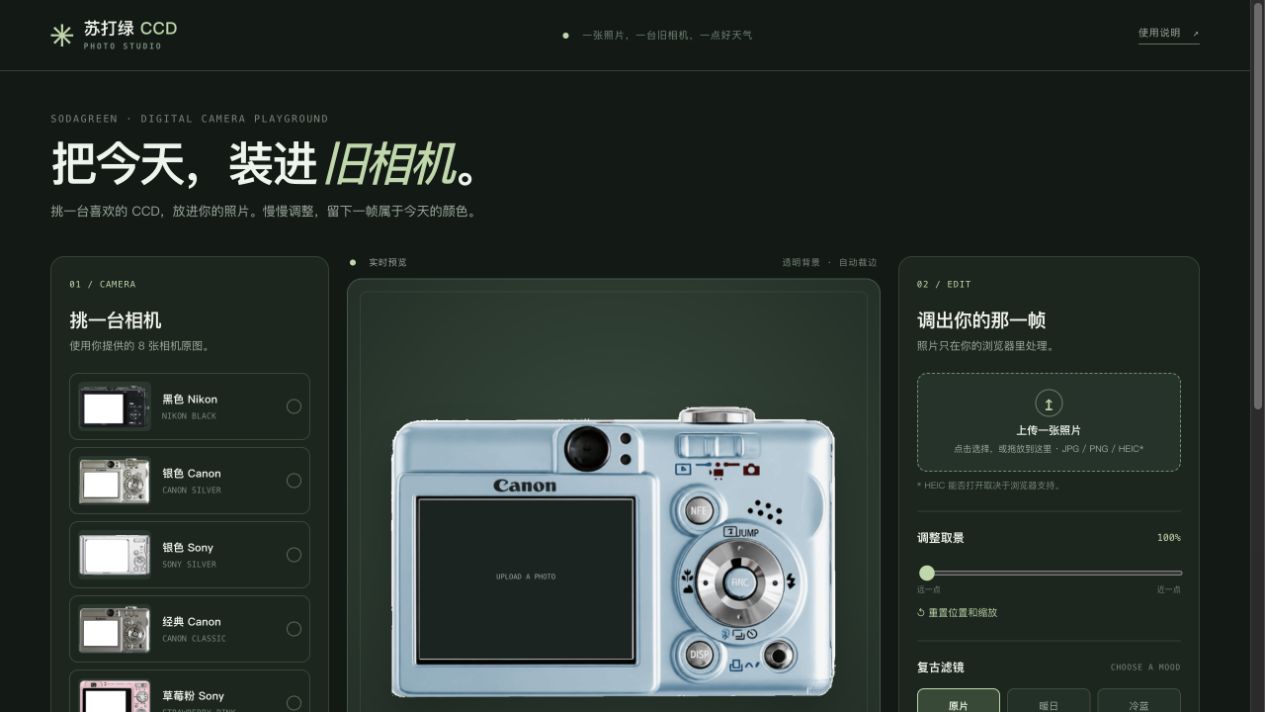
我想做一个适合小红书分享的照片小工具:让喜欢复古相机画面的人,选一台 CCD,把自己的照片放进相机屏幕。项目从我提供的相机素材和视觉想法出发。
I wanted to create a photo tool for sharing on Xiaohongshu: choose a retro camera and place your own photo inside its screen. It began with camera references and visual ideas I provided.
上传照片并选择相机;调整取景、滤镜和日期;预览后导出透明 PNG。网页还支持切换相机横竖方向和选择或上传背景。
Upload a photo and choose a camera, adjust framing, filters and date, then export a transparent PNG. The web version also supports camera orientation and choosing or uploading a background.
网页使用 8 款相机素材。每款相机分别校准外轮廓和屏幕区域,让上传的图片进入对应屏幕;用户可以移动、缩放画面,再选择滤镜和日期。
The web build uses 8 camera references. Each camera has its own calibrated outline and screen area, so the uploaded photo fits the correct display. Users can reposition and scale the image, then choose a filter and date.
编辑器提供 7 张内置背景,也可上传背景;背景用于编辑体验,不进入透明 PNG 导出。网页后来加入横竖屏切换;导出尺寸随相机比例和方向变化。
The editor offers 7 built-in backgrounds plus a custom upload. These are for the editing experience and are not included in the transparent PNG. Orientation was later added to the web version; export dimensions vary with the camera proportions and orientation.
我提出工具的场景和流程,提供相机及背景素材,决定视觉方向与功能顺序;通过与 AI 协作实现,再根据预览指出抠图、界面和操作问题并推动修改。
I defined the use case and flow, supplied camera and background references, and made visual and feature decisions. I worked with AI on implementation, reviewed previews, and directed corrections to cutouts, layout and interactions.
最初先选相机、再上传照片,调整区也占了太多空间。我提出改成先上传照片,再挑选相机,并缩小调整区域;更新后流程按照照片 → 相机 → 预览调整展开。
The earlier flow asked people to choose a camera before uploading, and the adjustment area took up too much space. I asked to move photo upload first and make the controls more compact. The revised flow follows photo → camera → preview and adjustment.
另一处改进发生在相机素材上:首版先用示意相机,我随后提供 8 张相机原图并要求把照片放进原有屏幕;后来又替换蓝色相机图、重新对齐屏幕位置,让预览和导出使用同一画面。
Another iteration concerned the camera imagery. The first version used placeholders; I then supplied 8 camera images and requested that photos sit inside their original screens. I later replaced the blue camera reference and asked for the screen alignment to be corrected in preview and export.
网页版本可预览和导出;另有较早版本的小红书离线适配包,平台模拟器与 Android、iOS 真机验证仍待完成。之后的横竖屏和流程调整未包含在该离线包中。
The web version supports preview and export. An earlier build was packaged for Xiaohongshu, but platform simulator and Android/iOS device testing remain pending. Later orientation and flow changes are not included in that package.
相机边缘白边的进一步修复仍需发布验证。
A further refinement to pale edges around the camera still needs publication and verification.
从一个主题出发,持续整理关键词A keyword workspace that grows with a topic
做 SEO 关键词拓展时,一个主题常常要分批探索、筛选和整理。我想把这些步骤放进一个工作区,让做内容研究的人能看到主题结构,也能区分新词与已有词。
Keyword research often takes several rounds of expansion, review and organization. I wanted one workspace where content researchers could see a topic’s structure and distinguish new ideas from existing ones.
问题不只是“再生成一批词”:同一主题反复拓展时,新结果可能与已选词重复。我的目标是把每次生成的候选词、已经收录的项目词库和历史批次区分开来,方便继续研究。
The problem was more than generating another batch. Repeated exploration of the same topic can produce overlaps, so I wanted to separate each batch of candidates, the saved project pool and generation history.
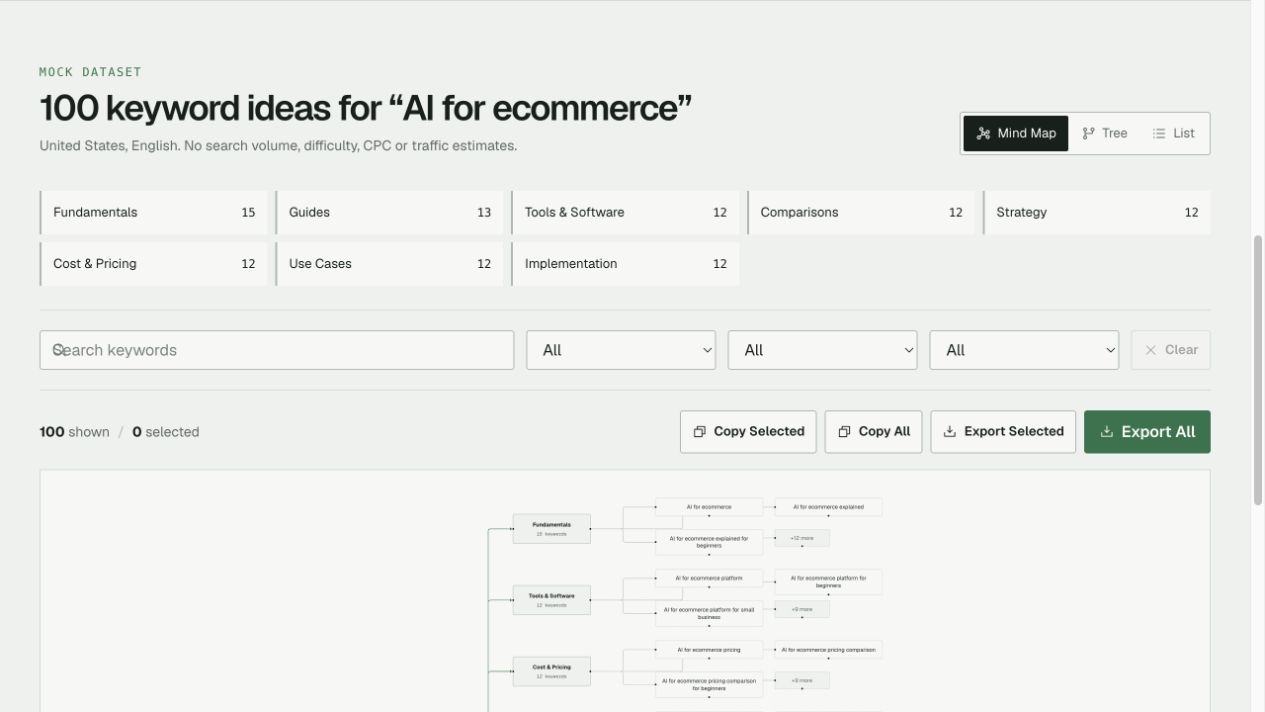
从种子词生成一批示例关键词,用搜索、意图和分类筛选;在思维导图、树形和列表之间切换;保留项目关键词并导出需要的结果。
Generate a sample batch from a seed term, filter by search, intent and category, switch between map, tree and list views, and keep or export selected project keywords.
生成界面提供 20、50、100、200 条预设,并可设置 1–500 的自定义数量;这些是模拟生成的设置范围,不代表真实搜索量。结果可在 3 种视图中查看,并支持 CSV、Excel、Word 和 Markdown 4 种导出格式。
The generator offers presets of 20, 50, 100 and 200, plus a custom setting from 1–500. These are mock generation settings, not search-volume figures. Results can be explored in 3 views and exported in 4 formats: CSV, Excel, Word and Markdown.
每次生成先进入当前批次;选择需要的词加入项目词库后,后续批次再与已收录词比较,标记 New、Similar 或 Duplicate。项目和历史记录保存在当前浏览器。
Each generation first appears as a current batch. Selected terms can then be added to the project pool, against which later batches are marked New, Similar or Duplicate. The project and history are stored in the current browser.
我提出产品需求和关键词工作流,确定功能取舍与命名;通过 AI 协作完成代码,再检查实际交互,反复调整导图、筛选和导出体验。
I defined the product requirements and keyword workflow, made feature and naming decisions, and worked with AI on the code. I then reviewed the interaction and iterated on the map, filters and export experience.
关键词展开后曾显得拥挤,滚轮经过导图时还会意外缩放。我要求默认只展开一个分类、为展开的词分配空间,并让普通滚轮继续滚动页面;缩放改为按住 Ctrl 或 ⌘ 操作。
Expanded keywords initially crowded the map, and the mouse wheel unexpectedly zoomed it. I requested one category open by default, more room for expanded terms, and normal page scrolling; zoom was moved to Ctrl/⌘ plus scroll.
我也重新梳理了“去重”和“筛选”:先清理空值、规范化文本并比较已收录词,再用搜索、意图、类型和分类控制当前看到的结果。筛选同步到 3 种视图,不会直接改写原始生成结果。
I also separated deduplication from filtering: first clean and normalize candidates and compare them with saved terms, then use search, intent, type and cluster to control the visible results. Filters update all 3 views without directly changing the generated data.
当前是可交互的模拟版本:关键词生成使用 Mock,重复判断以文本规则为基础,并非 embedding 语义去重;暂未接入真实 AI 生成。
This is an interactive mock: keyword generation uses sample data and duplicate detection relies on text rules, not embedding-based semantic deduplication. Live AI generation is not connected.
相似词判断使用词项重合度:达到 0.8 且意图、类型一致等条件时才标为 Similar。它并不理解措辞不同但含义接近的词;也未接入真实搜索量、关键词难度和 CPC 数据。
Similarity uses token overlap: a score of at least 0.8 together with matching intent, type and other conditions can mark a term Similar. It does not understand differently worded equivalents; live search volume, keyword difficulty and CPC data are not connected.
让内容诊断有依据,也有边界Making content readiness more understandable
在探索 GEO 时,我想为内容团队做一个检查原型:帮助他们看出页面是否容易被 AI 系统理解、核实和提取,同时避免把“内容准备度”说成能预测是否被引用。
While exploring GEO, I wanted to make a prototype that helps content teams inspect whether a page is understandable, verifiable and extractable by AI systems—without presenting readiness as a prediction of citation.
内容团队需要的不只是一个总分,还需要知道“哪一处值得先改”。因此我把目标定为检查可观察的内容信号,并让结果说明问题和建议,而不是给出 AI 平台会不会引用的承诺。
A content team needs more than an overall score: it needs to know what to fix first. I framed the product around observable content signals, with explanations and suggested actions instead of promises about whether an AI platform will cite a page.
可以输入网页地址或粘贴内容,查看相关性、证据和可回答性等信号;结果页展示问题、优先修复建议和声明检查,并配有方法论说明。
Enter a URL or paste content to review signals such as relevance, evidence and answerability. The results show gaps, prioritized fixes and a claim inspector, supported by a methodology page.
原型有 2 个输入入口:网址和粘贴内容。后续版本将诊断扩展为 8 项信号,包括目标查询相关性、可引用证据、信息增益、回答能力、可提取性、扩展意图覆盖、实体清晰度和证据来源质量。
The prototype has 2 input modes: URL and pasted content. A later version expanded the diagnosis to 8 signals: query relevance, citable evidence, information gain, answerability, extractability, follow-up coverage, entity clarity and source quality.
结果页展示最大的薄弱项、3 条优先修复建议和声明检查;另有中英文 2 种语言,以及方法论和博客页面,帮助理解指标和判断边界。
The results page shows the biggest gap, 3 prioritized fixes and a claim inspector. The product also has 2 languages, Chinese and English, plus methodology and blog pages explaining the signals and their limits.
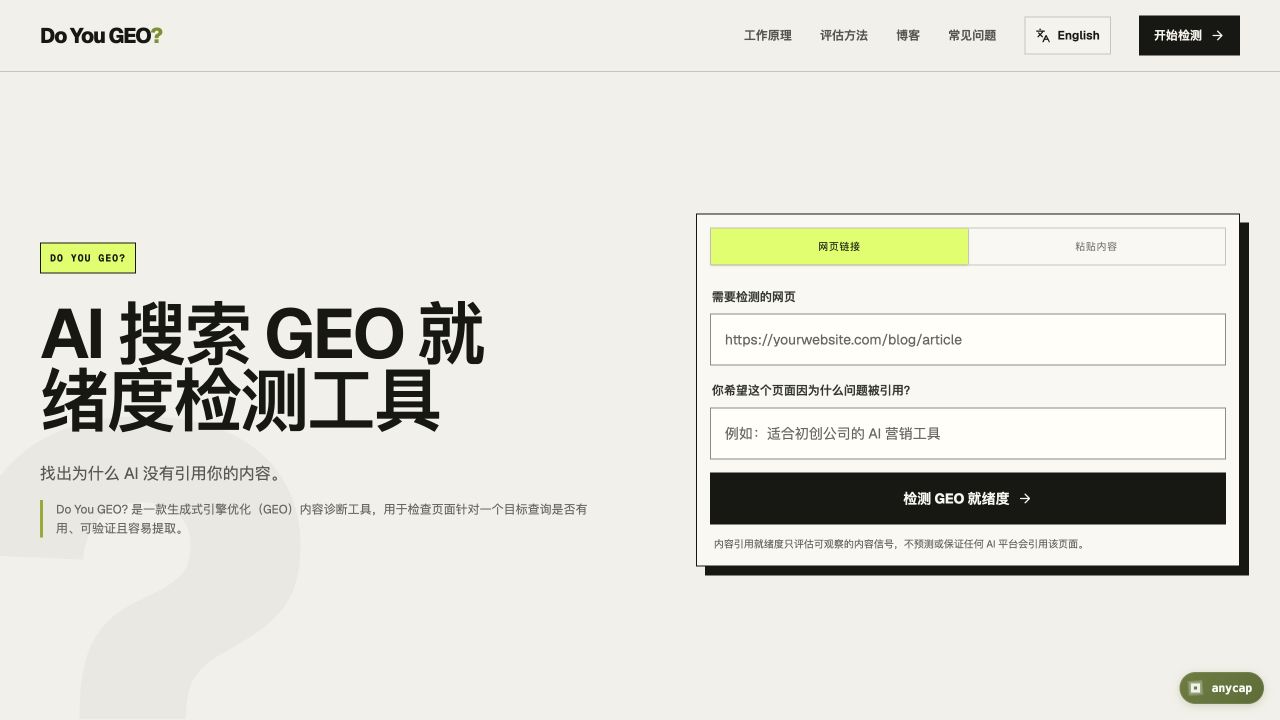
我确定产品定位、诊断流程与功能边界,整理需求并与 AI 协作搭建原型;随后推动双语版本、方法论和页面结构的完善。
I defined the product position, diagnostic flow and scope, organized the requirements and worked with AI to build the prototype. I then directed the bilingual experience, methodology and page structure.
第一版围绕内容本身诊断;后续我加入目标查询,让结果结合“希望回答什么问题”来判断相关性,同时在界面解释评分依据与优先修复项。
The first version focused on the content itself. I later added a target query so relevance could be considered against the question the page aims to answer, alongside clearer scoring explanations and prioritized fixes.
这个调整让同一篇内容可以放到具体问题下讨论:页面不仅要有证据和清晰结构,还要与目标问题相关。界面把目标查询放在输入区,并在结果里连接到相关性评分与建议。
This made it possible to consider the same content against a specific question: a page needs evidence and clear structure, but also relevance to the query. The input puts the target query upfront and connects it to the relevance signal and recommendations.
这是交互原型:网址模式使用示例结果,粘贴内容使用本地确定性规则;它不监测真实引用,也不能预测或保证 AI 平台引用。
This is an interactive prototype: URL mode returns sample results and pasted content is analyzed using local deterministic rules. It does not monitor real citations or predict or guarantee them.
8 项信号和 3 条建议是原型的设计范围,不是经过用户研究验证的效果数据。下一步需要真实网页抓取与后端分析,并检验规则在不同内容上的表现。
The 8 signals and 3 recommendations describe the prototype’s scope, not user-validated outcomes. A next step would be real page retrieval and backend analysis, followed by evaluation across different types of content.